Google My Business integration — the story of the hexagon, the microservice and the monolith
Google My Business integration — the story of the hexagon, the microservice and the monolith
A nightly task uploading data to a third party seems pretty straightforward, but if you add distributed systems and big amounts of data, nothing is ever so easy.
At Glovo we recently worked on a simple yet beneficial project — an integration with Reserve with Google that allows Google users to comfortably order from Glovo whenever they find one of our partner restaurants in search results or on maps. We recently launched this globally and thousands of users have already used this convenient feature to order through Glovo faster.
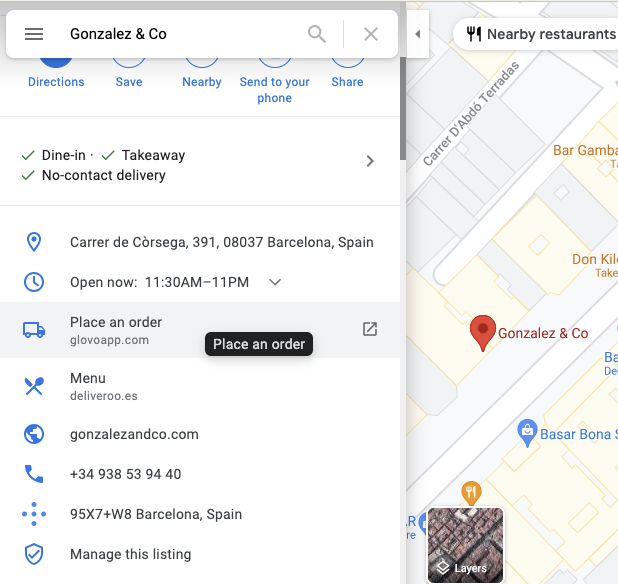
The integration looked easy — all we needed to do was to periodically send information about all our partner stores over SFTP in the form of JSON files. At that point we didn’t anticipate the number of problems that were yet to come, but we weren’t ignorant to the possibility of problems either. We started, as we start all non-trivial engineering projects — with an RFC where we presented possible solutions and put them up for discussion for anyone in the company.
Getting into how-to
Having discussed the project with the company’s engineering community, we decided to do it as a part of our monolith. As of that moment our system of events was not ready to provide all the data we needed, so implementing it as a microservice would require major redesign and development, at the same time “time to market” was an important architectural driver.
As much as “adding code to a legacy monolith” may seem scary, it doesn’t have to be. At Glovo if we add new features inside the monolith, we implement them as separate modules that have little or (preferably) no dependencies to other parts of the monolith. With the help of hexagonal architecture, it enables us to run the code decoupled from the rest of the application. This makes compilation and tests fast and helps us to move it to microservice at a later stage easily. It allows us not only to implement features quicker, but also to gradually define the bounded context of the future microservice domain.
We plan to write some more about this approach in one of our future articles, so stay tuned!
When the problems start
Fast forward a couple of weeks and we had our shiny module doing just what we wanted it to. We were happy to start uploading data to Google. That’s where the challenges started.
They were not impossible to predict, true. After all, it doesn’t take a rocket scientist to know that when you kill an instance, you stop whatever it was doing. It was only when we saw it in action, though, that we realized our connection to Google’s servers was habitually interrupted by application redeployments. The usual way of handling this problem would be to save some state in the database to be able to continue the process where it ended — this wasn’t an option for us — we couldn’t store a live SFTP connection to carry it on after restart and Google automatically started to analyze the file the moment that the connection was closed — so there was no way to add content to it later.
We applied two workarounds to solve this problem. One: we compressed the data with GZIP — this decreased the time of upload from 2 hours to 20 minutes, so the probability of getting interrupted by redeployments fell drastically. Two: we moved the execution to the middle of the night. While this worked like a charm, it might become problematic again if we open another tech hub in a different time zone. So in the long term moving it to microservice, where we would have control over new deployments, might be the best solution.
There were other challenges too. Our assumption when going for the monolithic approach was that we would exclusively use a read replica of our database. The idea behind it was simple enough: we do not need to write any data, and we did not want to cause the bigger application performance to suffer. As it turns out, however, if you use AWS’s Aurora, just using a read replica is not enough to safeguard against performance problems. As you can read in this great article by plaid, the inner workings of Aurora mean that read & write replicas are very closely connected, and what happens in one can impact the other. In particular, long-running read transactions on read replica can have a strong negative impact on the main instance.
There was also another issue that we were concerned with — the amount of memory we use inside our monolith instance. Both of those issues could be easily mitigated — by reading data in chunks and sending them through an open SFTP connection as they come.
Charms of the Hexagon
We decided to use a hexagonal approach to separate infrastructural concerns from the main job of mapping & sending data. To achieve this, we defined a clear contract between the core of our module and its dependencies. In our case, we had three ports — a driver port that called our module (in this case: the monolith), a driven get-data port whose implementation was in charge of talking to the database (here: another part of the monolith), and another driven port that received our data (implemented as a dependency within the module). Naturally, we wanted our shiny domain code to be clean and easily-testable, so we wanted it free of such infrastructural details as data batching. To hide it inside the adapter code, we did something very simple, but not necessarily obvious — we created a custom implementation of the Iterable interface. Our tailored class allowed carefree iterating, while underneath it loaded new batches in-flight when they were needed, therefore satisfying the mentioned requirements for short transactions and low memory usage.
It gave us the following definition of a database-aware port:
public interface MerchantProducerPort {
Iterable<MerchantData> getMerchants();
}
This allowed us to move the nitty-gritty details of handling batching to the monolith, resulting in the following Iterable code (the snippet below has been simplified for conciseness):
// method returning all the data
public Iterable<MerchantData> getMerchants() {
   SearchStatus searchStatus = new SearchStatus();
return new SupplierBackedIterableMerchants(
       queryBatchSize,
       () -> getMerchantBatch(searchStatus)
);
}
private List<MerchantData> getMerchantBatch(
SearchStatus searchStatus
) {
long pageNumber = searchStatus.nextBatchNumber();
   ...
   // retrieve the data batch from the database and map it.
   // SearchStatus implementation omitted for clarity - it’s mostly
   // for keeping track of which batch we should take now.
}
// Our implementation of Iterable
class SupplierBackedIterableMerchants
implements Iterable<MerchantData> {
private final Deque<MerchantData> batch;
private final Supplier<List<MerchantData>> batchSupplier;
// constructor omitted for brevity
   @NotNull
   @Override
public Iterator<MerchantData> iterator() {
return new MerchantIterator();
   }
   private class MerchantIterator
implements Iterator<MerchantData> {
       @Override
public boolean hasNext() {
if (batch.isEmpty()) {
List<MerchantData> newBatch = batchSupplier.get();
               if (newBatch.isEmpty()){
return false;
               }
               batch.addAll(newBatch);
           }
return true;
       }
       @Override
public MerchantData next() {
           if (!hasNext()) {
throw new NoSuchElementException();
           }
return batch.pop();
       }
   }
}
With the code above the main loop in our domain code could look the way one would expect it to look:
for (MerchantData merchantData : producerPort.getMerchants()) {
Merchant merchant = convertToMerchant(merchantData)
    merchantConsumer.push(merchant);
}
The consumer side
The chunk-loading-and-saving approach had some architectural consequences at the other end of the pipeline as well. Normally, we would like to have a simple adapter that could just consume the data. But since we only kept in memory a small chunk at a time and needed the adapter to keep the SFTP connection alive throughout all this process, it had to be stateful. This turned out to be a major constraint that we had to design our module around. So we ended up having two ports — FeedShardPort (representing shard of data at the google side) and FeedShardFactoryPort responsible for creating the former port and opening new SFTP sessions.
The domain
Last but not least, during the initial stages of the development, we had a discussion about what the domain of our task was. At first, we thought of a very thin domain that was responsible for just passing entities from one port to another. Then we realized that from a business perspective the point of the module is to transform our data to Google’s format and that business people use and understand Google’s terminology like “feeds” or “shards”, so we decided to include them as part of our domain and instead kept the consumer adapter thin taking care only of SFTP-related details.
The conclusion
The hexagonal architecture allowed us to write our domain code independently, whether it’s part of a microservice or the monolith, but we still had to deal with many monolith-related problems that we wouldn’t have encountered if we went straight for a microservice. In the end, if we decide to move it to a microservice later, we might end up having to solve twice the number of problems — both in the monolith and again in the microservice.
On the other hand, if we had started by implementing it as a microservice, with the amount of event-source and infrastructural work that still needed to be done at the time, I surely wouldn’t be writing this article yet. So as it always is with business — the question of choosing one option over the other does not have a simple yes/no answer. It requires a case-by-case analysis and an understanding of what the team’s priorities are.
Special thanks to Bart Szymkowski and other great people at Glovo that helped me redact this article.
Google My Business integration — the story of the hexagon, the microservice and the monolith was originally published in Glovo Engineering on Medium, where people are continuing the conversation by highlighting and responding to this story.